A developer CV guide written by the person who actually screens them, not an algorithm
Written from the recruiter’s desk
The tips in this article come directly from an HR Manager who reviews developer CVs daily. No filler, no theory, just the patterns that separate the CVs that get callbacks from the ones that get archived.
There’s a story that circulates among recruiters, the kind that gets told at HR meetups with a mixture of horror and affection. A candidate once submitted a 17-page CV. Not 17 pages of extraordinary accomplishments, but 17 pages of everything; every job, every course, every footnote of a life, dutifully listed.
The recruiter who received it didn’t hire the candidate. She did, however, keep the CV, as a cautionary tale she still tells today.
That story is funny because it’s extreme. But the truth is, most CVs that fail don’t fail so dramatically. They fail quietly, in ways the sender never finds out about. A title that’s too vague. Skills buried on page two. Three bullet points that describe what the project was, with nothing about what the developer actually did or changed.
The market is tough right now. You know it, every other developer knows it, and every recruiter knows it too, which means the pile of CVs landing on their desk is bigger than ever.
So what actually works? Below are insider recommendations from an experienced HR Manager who reviews developer CVs daily for European tech companies. These tips go far beyond the generic “keep it one page”. Every point here reflects real mistakes and winning patterns observed in hundreds of developer applications.
1. The header is your five seconds of first impression
Recruiters scan, they don’t read, at least not initially. In a busy hiring period, an experienced recruiter can move through dozens of CVs in an hour, which means your header has roughly five seconds to justify the next thirty.
The header of your CV needs to communicate three things instantly: who you are, what you do, and how to reach you. Everything else in the document can be nuanced, detailed, layered, but the header has one job, and that job is to stop the scroll.
State your role clearly at the top
Don’t make the recruiter guess. The very first line after your name should read something like Senior Angular Developer or Mid-level Frontend Engineer (React/Angular). Technology plus seniority level, that’s it.
A vague “Software Developer” or just your name floating at the top forces the reader to dig, and they might not bother.
This sounds obvious, but it’s one of the most common failure points. Make sure:
- Your phone number is current. Not the one from three years ago.
- Your email address is professional. A Gmail address is fine, better than regional providers that can have reliability issues.
- Both are immediately visible, not buried after two paragraphs of bio.
Location: city only, plus your work preference
You don’t need your full postal address. Just the city you’re based in, plus whether you’re looking for hybrid or fully remote work. Something like Warsaw, open to hybrid or fully remote, tells a recruiter everything they need geographically in one line.
Include all three if you have them, but only if they’re actually up to date. A GitHub with no commits in two years, or a LinkedIn that still lists your 2019 role as current, does more harm than good. Before submitting any application, check that your profiles are consistent with each other and with the CV itself.
2. Limit the bio section to 2 or 3 sentences
A short professional summary at the top of the CV is worth including. Not because recruiters read it first, but because it frames everything else. Think of it as the cover page of a report: it doesn’t replace the content, it primes the reader for it.
Keep it to two or three sentences. What you do, how long you’ve been doing it, and what makes your profile interesting. Avoid filler phrases like “passionate developer with a love for clean code”, as every CV says something like that. Instead, be specific and link the types of projects you’ve worked on, the scale, the context.
“Frontend developer with 6 years of experience building large-scale Angular applications in fintech. Focused on performance and team collaboration, with experience leading front-end squads of 4 to 8 developers.”
What about the photos? They’re not necessary, and omitting one is perfectly fine. If you do include one, make it a clear, reasonably professional headshot, not a vacation photo, not a group picture with someone cropped out, and not something from five years ago that no longer looks like you.
3. Adapt your CV to the job
Sending the same CV to every application is the single most common mistake among experienced developers. It’s also the most avoidable one.
Recruiters and hiring managers spend time on the job posting. They’ve defined the stack, the responsibilities, the level. When your CV reflects their language and priorities back at them, it reads as a match, even before your experience is assessed. When it doesn’t, it reads as generic, even if you’re actually a great fit.
Before every application, read the job posting again. Identify the technologies they care most about. Make sure those appear prominently in your CV, ideally in the first half of the page. You’re not fabricating anything; you’re surfacing what’s relevant for this specific role.
From the recruiter’s desk
When two candidates have similar experience, the one whose CV is clearly written for this specific role almost always advances first. It signals both attention to detail and genuine interest.
4. Make work experience the core of your CV
For mid-level and senior developers, work experience is the centrepiece of the document. Everything else is context. A recruiter looking at a senior profile isn’t scanning for potential, they’re looking for evidence.
What have you actually shipped, improved, or led? What was the scale? Who else was involved? The experience section is where those answers live, and if it doesn’t give them clearly and quickly, no amount of polish elsewhere will save the application.
List your positions in reverse chronological order, most recent first, always.
Write about impact, not just tasks
The most common weakness in developer CVs is describing what the project was, without explaining what you contributed and what changed because of it.
Compare these two descriptions of the same role:
| Avoid Weak version | Do this Strong version |
| Worked on a banking app using Angular and REST APIs. | Led front-end development for a mobile banking app serving 400k+ active users. Refactored the transaction module, reducing load time by 40%. Team of 6 developers. |
| Responsible for UI components and code reviews. | Owned the design system library used across 3 product teams. Introduced component documentation that cut onboarding time for new devs from 3 days to under a day. |
| Participated in agile ceremonies and sprint planning. | Facilitated sprint retrospectives and collaborated with product and design to reduce the average bug cycle from 5 days to 2. |
To sum up; for each role, aim to convey:
- the project’s scale or domain,
- your specific contribution,
- the team size or context,
- where possible, a measurable outcome.
Address frequent job changes directly
If you’ve changed jobs several times in a short period, a recruiter will notice. If those changes were due to circumstances outside your control, a company shutting down, a round of layoffs, an acquisition, say so briefly.
A single line like (company closed, 2023) or (restructuring, team dissolved) next to the role saves you from being incorrectly profiled.
Recruiters are human; context matters.
5. Personal projects: quality over quantity
Side projects and open-source contributions can genuinely strengthen a developer CV, but their role is to complement work experience, not replace it. A recruiter who sees a well-described side project gets a glimpse of how you think when nobody is assigning you tickets, what problems you choose to solve, what stack you reach for by default, how far you take something before you consider it done.
That’s a valuable signal. A list of twelve repository names with no context is not.
For mid and senior candidates, keep this section concise. One or two well-described projects are far more effective than a list of eight repository names. If a project has been abandoned halfway through, or the repository is empty apart from a readme, leave it out. An incomplete project listed without comment raises more questions than it answers.
For each project you do include, briefly explain what it does, the tech stack, and any notable metric or outcome, users, stars, usage in production. A link to the live project or GitHub repository is essential; otherwise there’s nothing to verify.
A project you can point to is worth ten you can only describe.
6. Technical skills: the section most CVs get wrong
This section is often either too sparse (“JavaScript, React, Node”) or so packed it becomes noise (“HTML5, CSS3, Flexbox, Bootstrap, jQuery, Angular 2, Angular 4, Angular…”). Neither serves you well. The sparse version tells a recruiter almost nothing and forces them to guess at your actual depth.
The overcrowded version, especially when every item is implicitly claimed at expert level, reads as either inexperienced or dishonest, and experienced technical recruiters will notice immediately.
The goal is not to list everything you have ever touched. The goal is to give an accurate, organised picture of where you are genuinely strong, where you are competent, and where you have working familiarity.
That kind of honesty is not a weakness, it’s exactly what a hiring team needs to assess fit quickly and accurately.
Organise by domain
Group your skills into clear categories rather than a single undifferentiated list. This makes it immediately scannable:
| Category | Example entries |
| Frontend | Angular (expert), React (proficient), TypeScript (expert), RxJS (advanced) |
| Backend | Node.js (proficient), NestJS (proficient), REST / GraphQL |
| Databases | PostgreSQL (proficient), MongoDB (familiar) |
| Tools and infrastructure | Git, Docker, CI/CD (GitHub Actions, Jenkins), AWS (S3, CloudFront) |
| Testing | Jest, Cypress, Testing Library |
Be honest about level, and be specific
Include a clear proficiency indicator for each skill. Something like expert / advanced / proficient / familiar works well. Or map it to years: Angular, 5 years, expert. Whatever system you use, be consistent and honest.
Claiming expert-level knowledge in something you used once for a tutorial is one of the fastest ways to lose credibility in a technical interview.
7. Soft skills, languages, and education
These three elements tend to get the least attention during CV writing, and it shows. Most developers treat them as boxes to tick at the bottom of the document, a few buzzwords, a language or two listed as “fluent,” a degree that takes up more space than it needs to.
Done carelessly, this section is just noise. When done well, it adds a layer of credibility and personality that pure technical experience can’t provide.
Here’s how to handle each one.
Soft skills
This section deserves a brief dedicated mention rather than three bullet points of generic buzzwords. For senior developers especially, the interesting soft skills are the ones that distinguish you as a senior: running code reviews, mentoring junior developers, working directly with clients or stakeholders, writing technical documentation. These are more meaningful than “good communicator” or “team player.”
Languages
List each language with a realistic proficiency level. If your spoken and written English differ significantly, you can split them: English written: C1, spoken: B2. Use established frameworks (A1–C2, CEFR) rather than vague terms like “conversational” or “advanced.”
Education
Keep it short: degree name, institution, year of graduation. That’s all that’s needed unless the role specifically calls for academic credentials.
8. The sections most developers skip (but shouldn’t)
There are parts of a CV that almost every developer either rushes through or leaves out entirely, not because they don’t matter, but because they feel optional. They’re not. These sections won’t save a weak application, but they regularly make the difference between two equally strong ones.
A recruiter who has spent three minutes with your experience and skills section arrives here either looking for reasons to move forward or reasons to hesitate. Give them the former.
Recommendations
If you have a written recommendation from a former employer or client. even a short one, include it or reference it. A genuine recommendation from a named professional carries more weight than any self-description you can write. Even a link to a LinkedIn recommendation helps.
Interests
This one surprises people, but a short interest section is viewed positively by many recruiters. The key is specificity. “Films” tells a recruiter nothing. “Independent cinema and documentary filmmaking” gives them a conversation opener and signals that you think in terms of depth rather than surface.
The same principle applies to any interest: “running” becomes “trail running (currently training for a 50k).” Keep it to two or three items. And make sure it’s true, this section tends to come up in interviews.
GDPR clause
Mandatory for CVs submitted in the EU. Include a data processing consent statement at the bottom of your CV, without it, a company technically cannot store your personal data. A standard clause is one or two sentences and takes thirty seconds to add.
9. Keep the right format and file hygiene
Content is what gets you the interview, but format is what gets your content read. A poorly structured PDF or a layout that breaks on a recruiter’s screen can undermine weeks of careful writing in seconds.
None of the following points are difficult to get right, which makes it all the more frustrating when they’re wrong.
Run through this list before every application.
✓ Simple, clean layout. Two or three colours maximum. Consistent alignment throughout. Readable fonts, nothing smaller than 10pt. Clear section headings. If you’re using a Canva or Figma template, make sure it doesn’t sacrifice readability for aesthetics.
✓ Export as PDF. Not .docx, not .pages. PDF renders consistently across all devices and operating systems. Your carefully formatted layout won’t break in a recruiter’s email client.
✓ Name the file properly. Jan_Kowalski_CV.pdf, not Canva_export_final_v3.pdf. Recruiters manage dozens of files. A properly named file is findable; an unnamed one gets lost or frustrates the person trying to reference it.
✓ Keep length proportional to experience. One page for junior developers. Two pages for senior engineers with extensive experience. Three pages only if every section is genuinely earning its space.
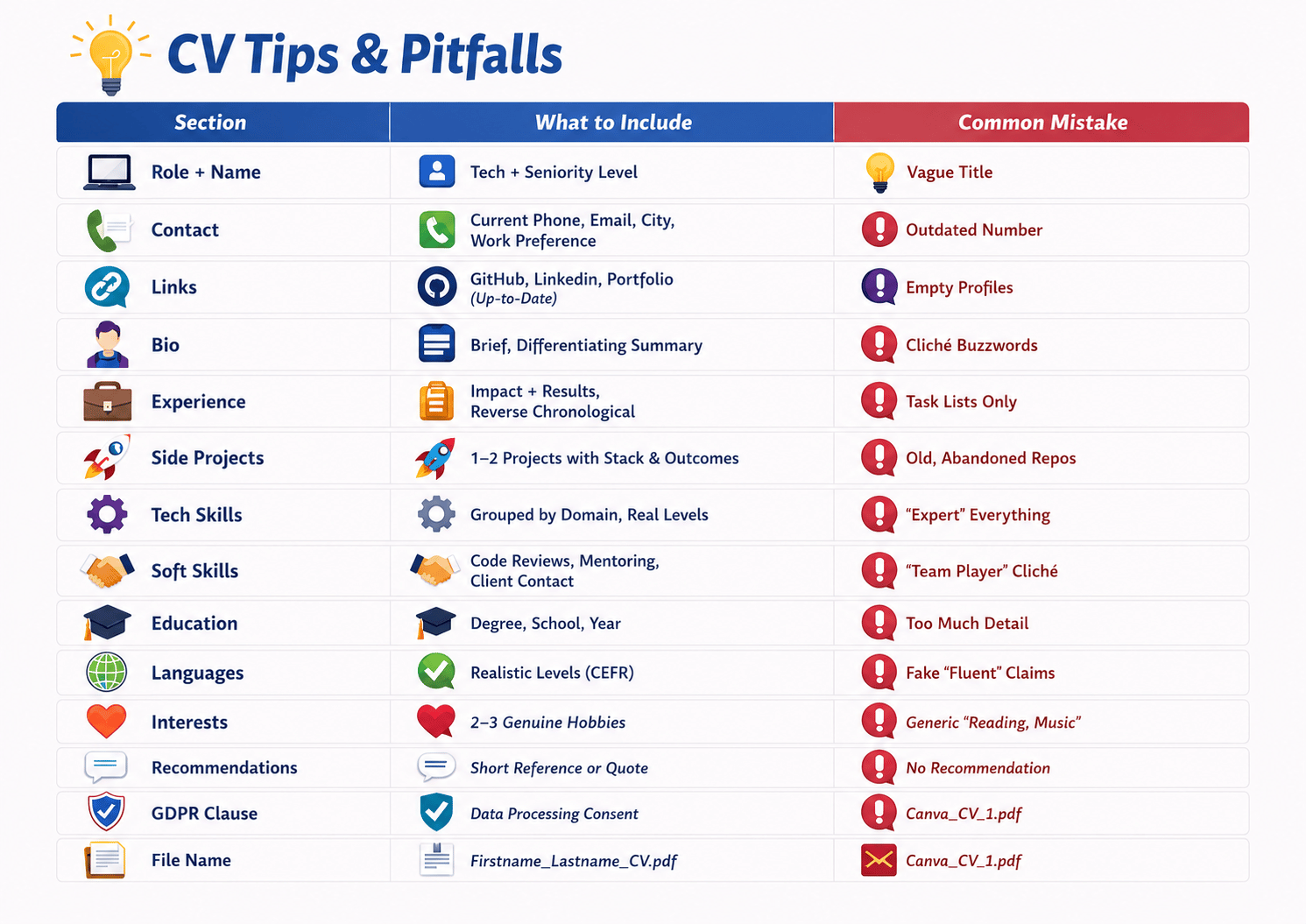
The complete CV checklist
Most CVs fail not because the person lacks experience, but because the document makes a recruiter work too hard to find it. By the time they’ve scrolled past a vague title, a wall of generic skills, and three bullet points that describe responsibilities instead of results, they’ve already moved on. You don’t get a second chance at that first scan.
The fixes are rarely dramatic. It’s almost never a case of needing to rewrite everything from scratch. It’s about small things that a recruiter sees dozens of times a day, and has learned to read very quickly.
What makes this hard is that these problems are invisible to the person sending the CV. You know what you meant. You know the context behind every bullet point. The recruiter doesn’t, and they’re not going to ask. They’re going to move to the next application.
Use the checklist below as your final check before every application, not once when you first write the CV, but every single time you send it. Something on that list will always need updating, and the five minutes it takes to go through it are the five minutes that separate a callback from an archive.
CV Tips and Pitfalls