
Tree shaking – what is it?
One of the biggest problems with Angular is the size of the created application. Nowadays, the size of our application stands for the amount of JavaScript users have to download on their devices. The Angular development team was given a bundle size optimization goal.
Cake Threshold. The name originates from the fact that the entire team was promised cakes, if they managed to go below 10 Kb for an app like 'Hello, World'.
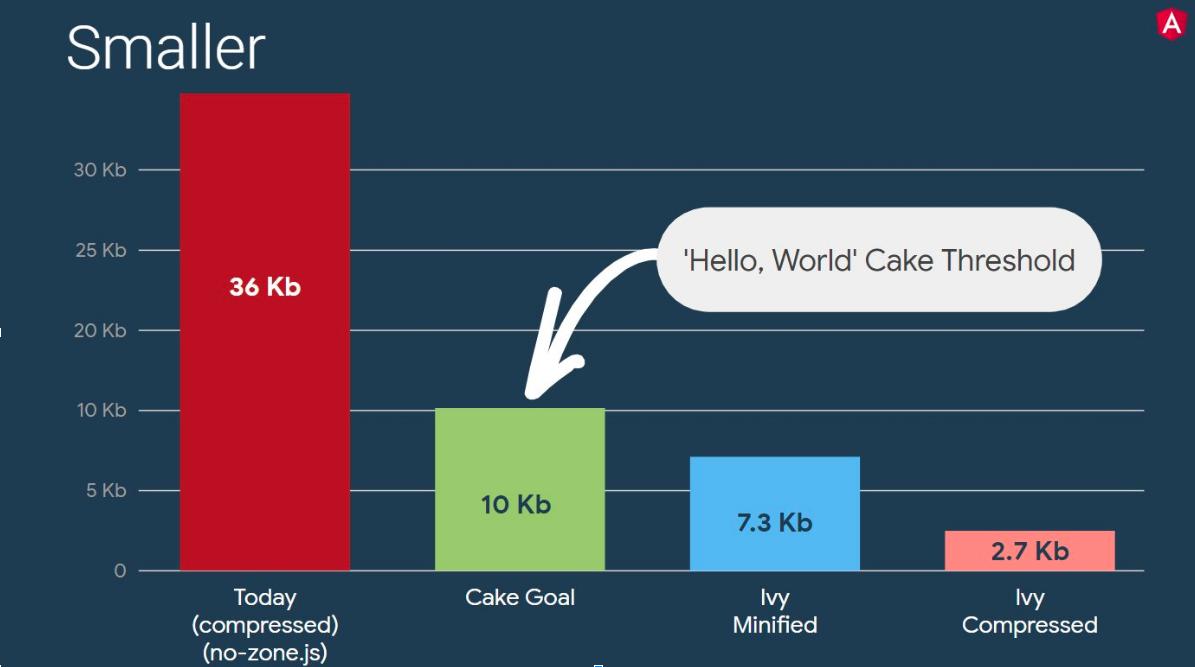
source: https://twitter.com/kuncevic/status/1050165141625483264
One of the optimizations they used with the new Ivy rendering engine was the introduction of the tree shaking technique. Tree shaking, also called dead code elimination, is a process during which unused code is removed from our build. This technique allows us to reduce the final size of our application.
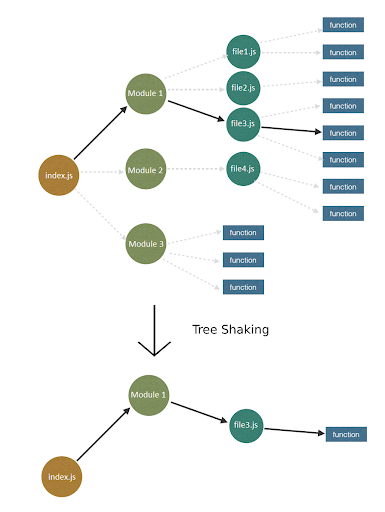
Tree shaking in Angular Ivy
The insertion of tree shaking to the new Ivy rendering engine was a big step towards application optimization. Now let's explain how Angular recognizes code fragments which it doesn't need. First, we need to understand what is the incremental DOM, on which the Ivy rendering engine is based.
Team Google decided to introduce Incremental DOM to achieve two goals:
- Smaller bundle size
- Reduce the RAM requirements of the rendering engine
Incremental DOM involves recompiling each component into a set of instructions. The instructions allow us to create a DOM tree and then update the parts with muted data. This approach allows us to get rid of the Angular interpreter from the final bundle. Additionally, the way the instructions are used to update the DOM requires less memory compared to the Virtual DOM used among others, by React, which generates full new versions of DOM trees.
What makes Incremental DOM allow the use of Tree Shaking?
By introducing instructions, during compilation, we can check if there is a reference from our component to a particular instruction. If there is no reference, we are able to perform Tree Shaking. In comparison, Virtual DOM relies on the interpreter, which is not able to check whether a given piece of code will be used in the application or not.
Knowing how the Tree Shaking technique works, let's see it in action.
Let’s start by creating a simple Angular application with a single component that uses interpolation and date pipe:
import { Component } from '@angular/core';

@Component({
  selector: 'app-root',
  template: `
    <h1>Title: {{ title }}</h1>
    <h2>{{ date | date }}</h2>
  `,
})
export class AppComponent {
  title = 'Tree shaking with Angular Ivy';
  date = new Date();
}
Next, we will use the Angular Compiler CLI to generate the Js files which will contain our component in the form of instructions. After executing the ngc -p tsconfig.json command, the component now looks like this:
import { Component } from "@angular/core";
import * as i0 from "@angular/core";
import * as i1 from "@angular/common";
export class AppComponent {
  constructor() {
    this.title = "Tree shaking with Angular Ivy";
    this.date = new Date();
  }
}
AppComponent.ɵfac = function AppComponent_Factory(t) {
  return new (t || AppComponent)();
};
AppComponent.ɵcmp = i0.ɵɵdefineComponent({
  type: AppComponent,
  selectors: [["app-root"]],
  decls: 5,
  vars: 4,
  template: function AppComponent_Template(rf, ctx) {
    if (rf & 1) {
      i0.ɵɵelementStart(0, "h1");
      i0.ɵɵtext(1);
      i0.ɵɵelementEnd();
      i0.ɵɵelementStart(2, "h2");
      i0.ɵɵtext(3);
      i0.ɵɵpipe(4, "date");
      i0.ɵɵelementEnd();
    }
    if (rf & 2) {
      i0.ɵɵadvance(1);
      i0.ɵɵtextInterpolate1("Title: ", ctx.title, "");
      i0.ɵɵadvance(2);
      i0.ɵɵtextInterpolate(i0.ɵɵpipeBind1(4, 2, ctx.date));
    }
  },
  pipes: [i1.DatePipe],
  encapsulation: 2,
});
/*@__PURE__*/ (function () {
  i0.ɵsetClassMetadata(
    AppComponent,
    [
      {
        type: Component,
        args: [
          {
            selector: "app-root",
            template: `
    <h1>Title: {{ title }}</h1>
    <h2>{{ date | date }}</h2>
  `,
          },
        ],
      },
    ],
    null,
    null
  );
})();
//# sourceMappingURL=app.component.js.map
Let's focus on the AppComponent_Template function. The first argument of the rf function stands for renderFlags, we can distinguish two modes 1 for RenderFlags.Create and 2 for RenderFlags.Update. When creating a component, we go from line 18 to line 24, adding our elements to an array called Logical View (LView), which holds the DOM elements, bound values, and directive instances.
This array is created per component and then used for Change Detection. When we enter the update mode, the advance instructions allow us to find the position of the updated element in the LView array. The values are stored in the cache, and the change detection process compares the new value with the current value. If you want to explore the topic in detail, I recommend this video: https://www.youtube.com/watch?v=S0o-4yc2n-8
Now let's focus on what we use in our application, which is Interpolation and Pipe. In the code, we can see the functions ɵɵtextInterpolate1 and ɵɵpipeBind1. Let's build the production version of our application and try to find these instructions. To keep our code readable we will build our application with the following command
env NG_BUILD_MANGLE=false NG_BUILD_MINIFY=false NG_BUILD_BEAUTIFY=true ng build -prod
And we are in fact able to find the following declarations:
function ɵɵtextInterpolate1(prefix, v0, suffix) { ... }And
function ɵɵpipeBind1(index, slotOffset, v1) { ... }Now let's see if after eliminating date Pipe we also get rid of ɵɵpipeBind1 from our created code. Indeed, after removing the date from our application, we no longer have a reference to Pipe, anywhere. Therefore, we will not find this code in our final bundle:

Additionally, comparing the sizes of our production builds, we got the following results (it is worth noting that the applications were built in a way that illustrates the difference in their size):
With Date pipe: 172.4 kB
Without Date pipe: 160.6 kB
In comparison, Angular 6: 258.2 kB
As we can see, the code has been eliminated by Tree Shaking. ?
To summarize, the new rendering engine introduced Incremental DOM which is based on instructions. The introduction of instructions allows us to scan the entire project, verifying references to specific parts of the entire project, counting references to specific parts of the Angular API and our code. Once this process is complete, we know exactly which fragments are not being used in the application, so we can perform Tree Shaking on those code fragments.
Bonus
To find out more interesting facts, I would like to redirect you to the article which describes how to simulate Tree-shakable components using Single Component Angular Modules (SCAMs):